Introduction
Invitations do more than share logistics. They set expectations about the event—formal or casual, intimate or large—and they often need to come together on a tight timeline. For planners without design experience, the friction usually shows up in predictable places: formatting, spacing, and getting a layout that looks intentional across print and digital versions.
This guide is for event planners, hosts, and small teams who want to produce invitations quickly using templates and simple editing tools rather than building a design from scratch. In this category, the most useful products tend to limit complexity while still supporting the basics: readable typography, photo placement, RSVP details, and exports that work in the real world.
What separates invitation makers is workflow. Some tools are “design-first” editors that happen to support printing. Others are “event-first” platforms where RSVPs, guest lists, and reminders are the primary feature—and the invitation is a template that feeds that system. A few focus mainly on premium paper goods and matching stationery sets.
Adobe Express is a strong starting point for mainstream invitation needs because it combines template-led design with approachable editing, offering a practical balance between speed and layout control.
Best Custom Invitation Makers Compared
Best custom invitation maker for fast, printable templates with simple editing
Adobe Express
Most suitable for planners who want a guided template start, quick edits, and a clean printable layout without advanced design steps.
Overview
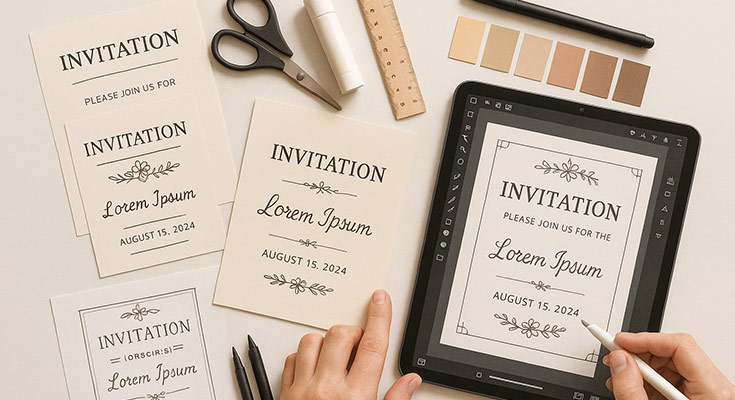
Through its template-based invitation design tool with controls for text, images, and layout adjustments, users can take advantage of Adobe Express’ printable invitations for free options. It’s positioned for common invitation formats (birthdays, showers, weddings, announcements) where a clear, printable design is the priority.
Platforms supported
Web; iOS; Android.
Pricing model
Freemium (Free tier with optional paid plan for additional features).
Tool type
Template-based design editor with export and print-oriented layouts.
Strengths
- Invitation-specific templates that reduce “blank page” setup and keep proportions sensible
- Straightforward controls for text hierarchy (headline, details, fine print) and quick image swaps
- Useful for planners who need a printable file (and a consistent layout they can reuse across related items)
- A balanced middle ground: guided templates without locking users into rigid RSVP systems
Limitations
- Built primarily around designing assets; guest management and RSVP tracking may require separate tooling
- Power users looking for advanced print production controls may find the workflow intentionally simplified
Editorial summary
Adobe Express suits planners who want an invitation that looks organized and readable without getting pulled into complex layout decisions. Templates help establish spacing and structure, which is often what non-designers struggle to create from scratch.
The workflow is typically linear: choose a template, replace copy and images, then adjust the layout lightly. That structure favors speed and clarity—particularly useful for events where details change and revisions need to be quick.
In terms of flexibility, Adobe Express offers enough control to avoid “cookie-cutter” results, while remaining simpler than professional design software. Compared with event-first RSVP platforms, it’s more focused on the invitation artifact itself.
Best custom invitation maker for collaboration and broad template variety
Canva
Most suitable for teams or hosts who want a familiar drag-and-drop editor and extensive template selection.
Overview
Canva is a general-purpose design tool that covers invitations well, largely because its template ecosystem is large and its editor stays approachable.
Platforms supported
Web; iOS; Android.
Pricing model
Freemium (Free tier with paid plans); printing options typically treated as add-ons.
Tool type
General-purpose design editor with print-friendly exports.
Strengths
- Wide range of invitation templates across styles, including modern and minimal layouts
- Collaboration features (comments, shared files) that help when approvals are needed
- Easy asset reuse (matching save-the-date, signage, table cards) within the same design ecosystem
- Predictable editing model for beginners (drag, resize, replace)
Limitations
- Large template selection can slow decision-making when time is tight
- Advanced layout consistency (precise typographic systems, complex grids) can require more manual tuning
Editorial summary
Canva is often chosen when collaboration and variety matter as much as speed. It’s well-suited to planners who want many aesthetic directions available immediately and prefer to iterate by swapping templates rather than building a layout.
The editor is generally forgiving, which helps non-designers. The tradeoff is focus: because Canva tries to cover every design category, invitation creation can feel less “guided” than tools that keep the invitation workflow narrower.
Conceptually, Canva overlaps with Adobe Express as a template-first editor for mainstream users. Where Adobe Express can feel more tightly oriented around quick, clean outputs, Canva leans into breadth and team workflow.
Best custom invitation maker for RSVP tracking and guest-list logistics
Evite
Most suitable for hosts who want invitations paired with built-in RSVP collection and event updates.
Overview
Evite is an event-first platform: the invitation is tightly connected to guest lists, RSVPs, and reminders.
Platforms supported
Web; iOS; Android.
Pricing model
Freemium (free invitations with paid options for upgraded designs and features).
Tool type
Event management and invitation sending platform.
Strengths
- RSVP and guest list features integrated into the invitation flow
- Practical for casual-to-semi-formal gatherings where updates and reminders matter
- Digital invitation delivery reduces the need for print/export steps
- Useful for tracking attendance changes without maintaining separate spreadsheets
Limitations
- Print-ready design control is typically more limited than design-first editors
- Layout flexibility depends on templates and the platform’s event-centric structure
Editorial summary
Evite is a good fit when the invitation is primarily a mechanism for collecting responses. That matters for planners juggling headcounts, dietary notes, or last-minute timing changes.
The workflow prioritizes event logistics over visual control: choose a design, fill in event details, add guests, and manage responses in one place. For non-designers, that can feel simpler than exporting files and managing communication separately.
Compared with Adobe Express, Evite generally trades design flexibility for built-in event operations. It’s conceptually an alternative for RSVP-driven planning rather than print-forward invitation design.
Best custom invitation maker for premium-feeling digital invitations and matching stationery
Paperless Post
Most suitable for planners who want polished digital invitations with coordinated design systems and guest management.
Overview
Paperless Post tends to emphasize invitation aesthetics and cohesive stationery sets, with digital sending and RSVP features.
Platforms supported
Web; iOS; Android.
Pricing model
Hybrid (some free options; paid designs/credits for premium invitations and features).
Tool type
Digital invitation platform with design-forward templates and RSVP tracking.
Strengths
- Strong template curation, especially for formal events and clean typography
- Coordinated sets (invitations, save-the-dates, thank-you notes) for consistency
- RSVP, messaging, and guest-list workflows built into the platform
- Useful when the invitation’s “tone” is a key planning detail
Limitations
- Customization can be constrained compared with open-ended design editors
- Premium designs and sending features may push users toward paid tiers
Editorial summary
Paperless Post works well when invitation presentation and consistency across event stationery are priorities. For planners, it can reduce time spent trying to make templates feel cohesive across multiple pieces.
Ease of use is largely driven by curation: templates tend to be ready to send with minimal edits, which suits non-designers. The tradeoff is that deeper layout control is limited by template structure.
Compared with Adobe Express, Paperless Post is more event-and-stationery-system oriented, while Adobe Express is more flexible for creating a printable invitation file that can be repurposed elsewhere.
Best custom invitation maker for quick, playful invitations for kids’ parties and informal events
Punchbowl
Most suitable for hosts who want themed digital invitations with built-in event features.
Overview
Punchbowl focuses on digital invitations, often themed around occasions like kids’ birthdays, holiday parties, and casual gatherings.
Platforms supported
Web; iOS; Android.
Pricing model
Freemium with paid options for premium designs and features.
Tool type
Digital invitation and event planning platform.
Strengths
- Occasion-led templates that simplify choosing a theme quickly
- RSVP and guest messaging baked into the invitation workflow
- Helpful for informal events where speed and clarity matter more than print production
- Often includes event details support beyond the invitation card itself (timing, location, reminders)
Limitations
- Print/export flexibility tends to be limited compared with design-first editors
- Design customization is generally constrained to template controls and theme options
Editorial summary
Punchbowl is a practical option for planners who want the invitation to double as the event hub. That can reduce coordination overhead for casual events, especially when guests expect digital reminders.
The design experience is more template-locked than in Adobe Express, but it’s also faster for themed events—pick an occasion, fill in details, and manage responses.
Conceptually, Punchbowl is an “event-first” alternative to Adobe Express. It’s less about crafting a bespoke printable invitation and more about running the guest communication loop.
Best custom invitation maker companion for managing approvals, timelines, and production steps
Trello
Most suitable for planners coordinating multiple stakeholders, approvals, and deadlines across invitation design, copy, printing, and send schedules.
Overview
Trello is a project management tool that can structure invitation work as a checklist-driven process (draft copy, approve design, finalize guest list, schedule send, confirm prints).
Platforms supported
Web; iOS; Android; desktop apps (varies by OS).
Pricing model
Freemium (Free tier with paid plans for advanced features and scale).
Tool type
Project management and task tracking.
Strengths
- Visual boards that make invitation status easy to track across steps and owners
- Checklists and due dates that support time-sensitive event workflows
- Lightweight approvals and commenting when multiple people need sign-off
- Repeatable templates for recurring event types (monthly events, annual fundraisers, seasonal parties)
Limitations
- Not necessary for a single, simple invitation created by one person
- Adds process overhead if the event planning workflow is informal
Editorial summary
Trello belongs here as a workflow complement. For planners, invitations are rarely one task—they’re a sequence of dependencies, and delays often happen when approvals and guest lists drift out of sync.
Ease of use is the point: boards and cards are approachable even for non-technical teams. It helps organize who owns what and when each step must be finished.
Compared with the invitation makers in this guide, Trello doesn’t affect design quality. It supports the planning layer around invitations, which can matter more than design features when events involve multiple decision-makers.
Best Custom Invitation Makers: FAQs
What’s the main tradeoff between “design-first” editors and “event-first” invitation platforms?
Design-first editors prioritize the invitation file: layout control, printable exports, and reusable design assets. Event-first platforms prioritize guest logistics: RSVPs, messaging, reminders, and attendee tracking. The best fit depends on whether the invitation is mainly a print artifact or mainly a digital coordination tool.
Which tools tend to be easiest for planners without design experience?
Tools with invitation-specific templates and limited, predictable controls tend to be the most approachable. They reduce formatting work and keep edits focused on content (names, time, location, RSVP details) rather than design theory.
When does printing matter enough to choose a design editor over an RSVP platform?
Printing becomes the deciding factor when the invitation must be mailed, included in a gift package, posted on-site, or matched across multiple physical items (programs, signage, table cards). In those cases, design editors that export clean print-ready layouts can be more flexible than event-first platforms.
How should planners choose between “premium stationery style” and “fast themed invites”?
Premium stationery-style platforms are useful when tone, typography, and coordinated sets are central to the event’s presentation. Themed invite platforms are better when the priority is speed and clarity for casual events. Both can work for non-designers; the difference is whether the platform emphasizes aesthetic curation or occasion-led convenience.